Updated January 2026

How does Smart Pay work with ARIVE?
What is Smart Pay?
It is a secure and user-friendly platform we use to collect credit report payments from borrowers.
The cost of credit reports has greatly increased, and many firms are having the borrower pay for the report up front.
When you get set up with C2C, you will receive a personalized link the borrower will complete.
Where is it?
IT Support will help you add it to your signature line for quick reference and on your webpage.
Example:
click here to see a sample: https://www.coast2coastmortgage.com/lizmiller/
What Happens Next?
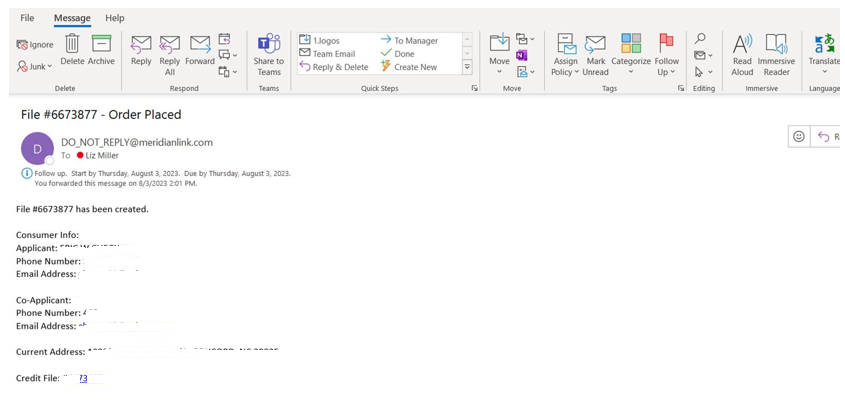
Once the client completes the steps, you will receive an email with a reference number. (see image below)
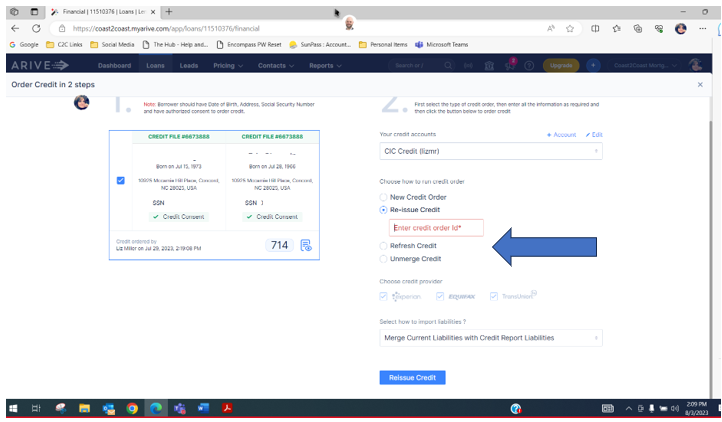
Then in ARIVE:
- Click order credit
- Select Re-issue Credit
- Enter the reference number
- That will pull it into ARIVE
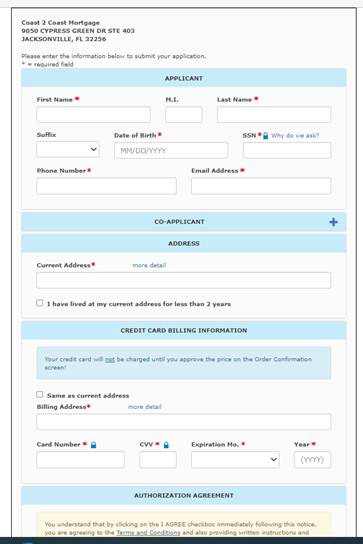
What the client needs to complete:
Email Sample C2C User receives:
Enter the Credit File# in ARIVE
REMINDER: you are set up with TWO accounts at CIC.
- One is for Soft Pulls
- One is for a Full Report
Make sure you know which account you are using.
Was this article helpful?
That’s Great!
Thank you for your feedback
Sorry! We couldn't be helpful
Thank you for your feedback
Feedback sent
We appreciate your effort and will try to fix the article